Auto Batching process Live EPC PSP
We are currently implementing an auto-batching process for PSP, under which the following steps should be followed when dealing with partners:
FAQs
-
When will we try to create a batch via autobatching?
The auto-batching will create the batches on D+2 where D is the current date. If a batch cannot be created on D+2 then it will try on D+3 and so on.
For example: A partner got a strike on 15th July, the first batch that we will try to create would be on 17th July.
-
Till when will we try to create a batch via autobatching?
This is configured across category teams.
For example, if a category gives the config as up to 7 days we will try to create a batch. A partner got a strike on 15th July, the first batch that we will try to create would be 17th July onwards. However, trainer bandwidth was not available, and we were unable to create a batch. We will keep on trying till 23rd July till a batch is created.
-
Can partners be backfilled in an ongoing batch?
Yes, partners can be backfilled in an upcoming batch.
-
Can we extend the duration of an existing batch?
No, an RT batch cannot be extended.
-
How will the partner attendance be marked in a batch?
For offline slots, a QR code will be there for Partners to scan at the start time and end time of the batch. This will mark the attendance for that particular day.
What happens if a partner drops off from an ongoing batch or the booking is canceled?
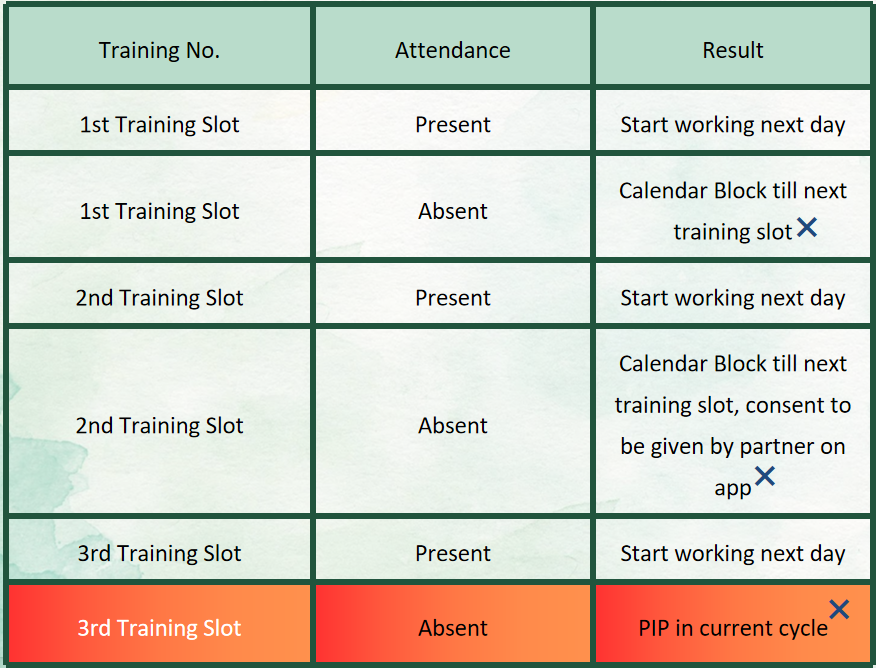
Training Slots & Attendance Guidelines:
1st Training Slot
Present: Allowed to start working the next day.
Absent: Calendar will be blocked until the next training slot.
2nd Training Slot
Present: Allowed to start working the next day.
Absent: Calendar will be blocked until the next training slot. Consent must be given by the partner on the app
3rd Training Slot
Present: Allowed to start working the next day.
Absent: Placed under the Performance Improvement Plan (PIP) in the current cycle.