Hub - Add/delete/change
Scenario |
SOP |
Partner wants to change hub due to distance issue/If partner wants to remove the hub due distance |
Scenario 1:If a partner requests a hub change due to distance (more than 15 km), verify the partner’s address and calculate the distance from the current hub. If the distance exceeds 15 km, fill out the required form and keep the ticket pending for 48 hours. Check the same via google maps: Check distance between partner address and partner's hub. Response sheet |
2. Hub change request due to less demand in existing hubs |
Refer Themis for this scenario, If the Themis criteria are met, we will make the change. If not, we will inform the partner that the change is not possible, and it will only be done based on demand. |
No hub tagged/Hub removed from business team |
> If partner is not tagged in the request Hub – then we’ll share the request with the category manager via MASTER FORM and keep a ticket pending for 48 hours. we'll close the case after conveying the revert received by the CM to Pro. Response sheet |
Relocation: partner relocating to a different area |
Refer Themis for this scenario, If the Themis criteria are met, we will make the change. If not, we will inform the partner that the change is not possible, and it will only be done based on demand. |
Rationale |
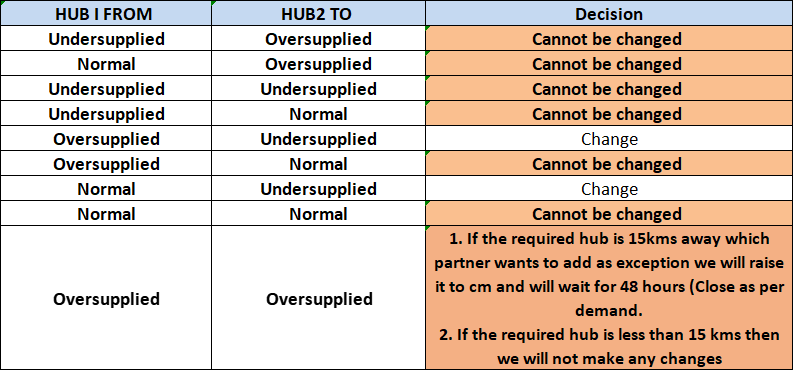
Denial if partner wants to move from a normal/undersupplied hub to oversupplied |
Tagging : 2.2 Profile- Profile related escalation < Hub-Add/delete/change | |
How to Use THEMIS
Navigation:
Ops Dashboard → Themis
Or Direct link: Themis Link-
Process Flow:
Check if the desired area is already covered under current hub using Hub Maps.
If already covered → Inform partner → Close ticket (no changes).
If not covered → Inform about areas under new hub → Take partner's agreement → Proceed.
-
Identifying Changes through THEMIS:
Steps:
Select Sub-Category.
Select City.
Use Hub Maps to locate hub.
Select Desired Hub.
Themis Criteria for Hub Changes
Partner Self-Check Instructions:
Teach Partners How to Check Hub Coverage Themselves:
Go to Top 3 lines (menu) in the app.
Go to My Hub from profile.
Zoom in/out to view details or covered areas of the hub.
Verbiage for Not Changing Hub:
"Sir, hub add iss liye nahi ho sakta hai kyunki jo hub aapko chahiye usme pehle se hi utne partners available hain jitne ki requirement hai. Agar aapko uss hub me add kar denge to kisi ko bhi prayapt leads nahi mil payenge, jisse sabhi partners ki earning me kami hogi. Isiliye system aise design kiya gaya hai ki sabhi partners ko barabar ka mauka diya jaaye."