Transfer of Credits Deduction - Advance Transfer to Your Credits Balance
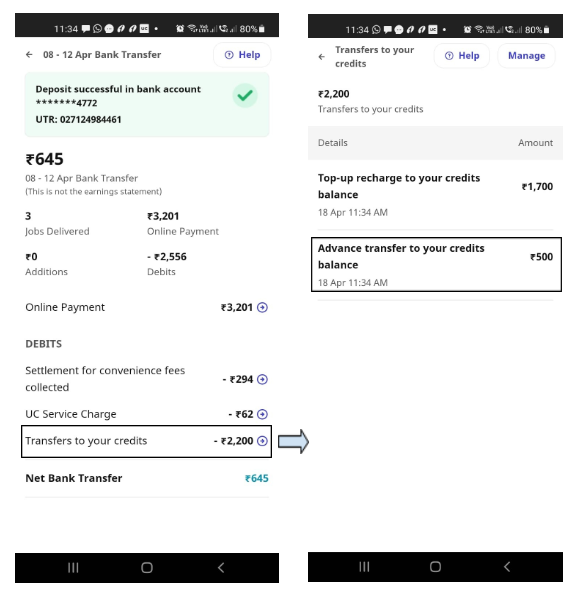
Advance Transfer to Your Credits balance(Payout Recharge Recovery)
- In this feature Partner can use an eligible amount(33% of Online Payment received in any ongoing payout) from future payout to recharge his credit balance
- This feature can be disabled from the App if Partner doesnt want to use amount for recharge from Upcoming Payout
- Partner often reaches out for doubts around this deduction and complain that they havn't receive any credit against the deduction,
- For this find "Payout recharge" Credit Addition in Partner's Credit Balance Dashboard(Monetization Dashboard) between Last Payout day and Current Payout Day, any credits given in this time period will be recovered from next payout.
Then Click on Partner credit balance and try to look for payout_recharge tag and check if deducted amount matches with the credits added with payout_recharge tag - Refer Snip 1 to refer deduction shown on partner app
- For this find "Payout recharge" Credit Addition in Partner's Credit Balance Dashboard(Monetization Dashboard) between Last Payout day and Current Payout Day, any credits given in this time period will be recovered from next payout.
- Disable option
- Partner to clikc on the credit balance < ckick on the payout_recharge disable < once done no recharge will be done
- Partner to clikc on the credit balance < ckick on the payout_recharge disable < once done no recharge will be done
Tagging: 1.2 Money - Payout Issue>> payout deduction - recharge